Nettica Overview and Architecture
Overview
Nettica offers more than just an IP address; it provides a complete network solution for all levels of user. Nettica provides solutions for individual users just wanting to be safe from bad actors at the local coffee shop, for advanced hobbyists wanting to give themselves, their family, and their friends access to the content on their network, and for enterprises wanting a quick and easy way to securely connect their employees to the corporate network and/or each other.
YOU Have Full Control.
Our network architecture is designed around Zero Trust principles—which means we constantly verify the identities and permissions of every user, whether they are accessing your network from inside or outside—and our administrative policy is built around giving YOU as much control over your networks as you want to take on.
- When you add a service through the Nettica VPN Admin page, we create a dedicated Docker container instance* in the geolocation you choose. No other Nettica VPN customers can access your service. The container setup has logging disabled by default. When you delete the service from your Nettica VPN Admin page, the container is destroyed. Neither you nor Nettica VPN can recover that container instance.
- You don’t need to use our cloud services; you can use our Docker container to create your own cloud instance, or you can install our agent directly on your own local Debian, Fedora, or Windows machine. Our agent runs splendidly on a Raspberry Pi!
- You decide what authentication provider to use. We support Apple, Google, and Microsoft authentication through the OAuth2 protocol.
- You decide who gets to access your Nettica VPN. Access to each of your networks is via an allow-list, which defaults to empty. Invite only the users you want, and only add them to the specific networks you want them to use.
- Nettica VPN uses role-based privilege control. You decide who has administrator rights on a per-user, per-network basis.
* Our Docker container is a virtual machine image that has Nettica VPN already installed and configured. With Docker containers, we can start your Nettica VPN service immediately, and have you securely surfing the Internet in just seconds.
Logs and Privacy
Nettica VPN complies with the “no logs” policy standard. Our underlying technology, WireGuard, only maintains state with the WireGuard infrastructure you are using, not the websites you are visiting. Our admin website has necessary, non-customer-sensitive logging. We can use them to diagnose problems and manage the service, but they do not contain information about what sites you visited or what you did. The logs, if available, reside on your network. They are for you; you can view them at any time to see what’s in them. It would be irresponsible not to provide them to you.
We also take a pragmatic approach towards privacy. We use OAuth2 to identify you and those you invite to your networks. This is not a design flaw – you want to authenticate the people accessing your network, and we provide a simple and elegant solution. It also means that, if you choose Apple, Google, or Microsoft as your authentication provider, Nettica VPN will not have access to your users’ passwords. For additional privacy, Apple specifically also provides a feature that creates an email address specific to Nettica services. And if you’re worried about sharing your own regular email address with us, it’s easy to create a single-purpose email address.
For additional security, the network administrator can give Nettica EZ-Codes to their users, so the users can configure their devices without having to log into the service. Administrators control which devices are allowed to connect to which networks. A device configured with EZ-Code can connect to and disconnect from the VPN, and it can delete itself and/or its access to a particular VPN, but it cannot access or add itself to any other networks in the administrator’s account.
Open Source
Nettica is 100% open source. We do not expect you to believe us when we say we’re secure, you can check for yourself. With 35 years of experience building software at scale, we have nothing to hide. We use standards-based technologies, and our source code is available on GitHub.
Network Security and Isolation
When you create a network you define the name and subnet. Every single Nettica customer can specify the same name for their network and the same subnet for their network, and it has no impact on other customers. That is real isolation.
We also provide a unified view of your assets wherever they may be. If you have devices in multiple clouds (like we do!), you likely also have a jumble of auto-generated subnets to deal with. We provide a single pane of glass uniting all of your assets.
A network also contains a template for creating new hosts. When a new host joins a network, it gets an IP address out of the subnet along with the rest of its configuration (DNS, etc.). It creates a network interface with this configuration and traffic flows based on it.
Because a network is a group of hosts with a similar configuration, they can all share the relay or tunnel container, which acts just like another host in the network. You can also invite friends or coworkers to join a network. This leads to a much different VPN story than the monolithic OpenVPN implementations. Networks are small, nimble, and compartmentalized. An organization should have multiple networks organized however makes sense for them. They could have dev, test, and production networks. They could have marketing, sales, and product networks. It could be regional or per project. The possibilities are endless.
Nettica VPN’s encryption is based on private-key/public-key architecture. Private keys can be generated on the agent and never leave the device–we don’t have access to them. Nettica also uses WireGuard pre-shared keys to both double encrypt the traffic, as well as secure the public keys from anyone monitoring the traffic. OAuth2 is used to validate users based on their email addresses. In our tunnel and relay services, containers are used to isolate customers. Containers also isolate the processes and memory used from the hosting server. There is no logging inside the container.
Network Policy allows you to manage the openness of your network: make it open, or lock it down. Role-based access control means only those people you choose can make changes to the networks.
Architecture
We have a distributed, reactive architecture that is stateful and eventually consistent. It is a polling architecture, where, regularly, the Nettica Agent will securely query for configuration changes from the Nettica Service. Most of the time this returns immediately when there are no changes, but if not, it will receive the new configuration, compare it with the old configuration, and make whatever adjustments are needed.
We doubled down on this architecture when looking to implement our relay and tunnel services. Our service hosts are Linux servers running the Nettica Agent, but in addition to polling for their Nettica VPN configuration, they also poll for their Service Host configuration. When you configure your relay or tunnel service, the Nettica Agent running on a given service host will see the update, and launch a container image with the specifics of your service. You can run this image yourself, it’s on Docker Hub.
The container provides real security and real customer isolation. Each Nettica VPN runs in its own isolated container, maintains its own individual state, and manages its own private IP address space. There are no shared resources between different Nettica VPN instances. We use secure, proven cloud principles.

Topology
The screen grabs below are from our admin console. With Nettica you can visually see the network as you are making it.
Traditional VPNs offer only a ‘hub and spoke’ architecture, restricting remote users’ tunneling capabilities to any off-site resources by requiring validation and traffic throughput limited via a central hub.
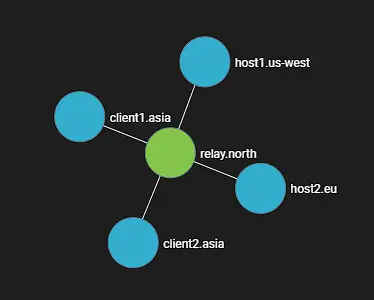
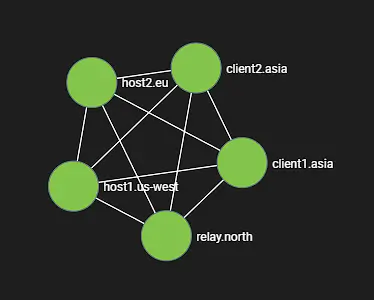
We provide a hub-and-spoke VPN architecture on demand with our relay service. It has some advantages in terms of supporting coworkers or accessing cloud resources through a bastion. But we also offer a point-to-point method of tunneling resources across a mesh framework, so regardless of the physical location or status of a central hub, you can traverse resources with superior speed and significantly less fragility. Simple mesh-centric IP management combined with a public/private key-sharing service, as well as our DNS microservice, provides you with an elastic fabric for connecting resources wherever they may be.
DNS
We implemented DNS as a microservice in the Nettica Agent. The agent listens on the DNS port (53) of the interface where enabled. The microservice reads the configuration of the network and creates a simple lookup table for forward and reverse DNS entries. It also registers the DNS with the host so that it receives queries. It will respond authoritatively to those hosts that match the hostnames in the network. It will respond with SERVFAIL for all other queries, or query the next DNS server in the list. The Nettica DNS server prevents DNS leaks by blocking and/or “black-holing” unexpected queries. (A “black hole” DNS server returns a “nonexistent address” response to requests that might otherwise expose a user’s private IP address.)
In addition to the microservice for resolving network hosts, you can specify whatever DNS servers you want in the network configuration. This might be your internal resolvers, or maybe a global DNS provider if you’re using our tunnel service. We offer maximum flexibility and expose as much WireGuard functionality as possible.
Performance
Our performance cannot be beaten. You can say that’s the benefit of being in the cloud. Not only do we have solid, jitter-free bandwidth, but we’re also in the locations where companies host their websites and services, so there’s minimal additional latency. Officially we’re only going to promise reliable 100Mbps in-region streaming, but we won’t be the bottleneck in your network. You’ll be throttled by your wireless connection to your router or ISP before having issues on our end.
Technologies
Nettica uses these technologies:
- WireGuard for networking
- OAuth2/OIDC for authentication
- MongoDB for the database
- Golang for the microservices and backend
- NodeJS for the front-end
- Docker for the containerization
- Dart, Swift, Java, Kotlin, and Go for the mobile apps
- UPnP for firewall management (port forwarding)
- NAT-PMP for port forwarding in the mobile apps
We built our cloud using these providers:
- Amazon Web Services
- Oracle Cloud Infrastructure
- Microsoft Azure
- Google Cloud Platform
They are all connected with Nettica, of course.
WireGuard™
WireGuard has the seal of approval of Linus Torvalds and is embedded in the latest Linux kernels. It is open-source technology, offering best-in-class cryptography. It aims to be faster, simpler, leaner, and more useful than IPsec and is considerably more performant than OpenVPN. WireGuard is designed as a general-purpose VPN for running on embedded devices and supercomputers, fit for many different circumstances. Initially released for the Linux kernel, it is now cross-platform (Windows, macOS, BSD, iOS, Android) and widely deployed. It is still in active development and is regarded as the most secure as well as the fastest VPN solution in the industry. Our networks simplify what would otherwise be significant overhead in managing WireGuard VPNs, securely. Nettica was built from the ground up to create and manage WireGuard™ networks. Wireguard does not provide built-in management, meaning there is no simple mechanism for synchronizing changing network configurations on the fly. Well, not until now.
OAuth2
We offer users single-sign-on using OAuth2 providers, including Apple, Google, and Microsoft. This includes any multi-factor authentication enabled for your account. If Google is your identity provider, you can log in seamlessly with our service using your custom domain. We can also do this with Microsoft Entra ID-based domains for enterprise customers. If you’ve outsourced your identity management that’s fine too, so do we. We can integrate with many services through the OAuth2 and OIDC standards.
UPnP
Activating UPnP enables several functions. First, it automates the configuration of port forwarding. In addition, we query the gateway for the external IP address and update the host’s endpoint if it changes. This enables a variety of scenarios for laptops and road warriors. It also eliminates the need for a DDNS provider. UPnP is an optional feature and can be turned on individually per host. It is not necessary to use the service.
In addition to UPnP, we also provide Sync Endpoint functionality that automatically syncs your IP address if it changes. It will not, however, configure port forwarding. This feature is geared more towards customers that already have their ports configured, or use NAT traversal.
NAT-PMP
Our mobile apps support VPN server functionality! When a mobile device is configured as a server, we use NAT-PMP to configure port forwarding (if the UPnP flag is enabled for the device), and our IP service ip.nettica.com to configure/update the external IP address. For automatic server updates enable push notifications for our app. (Real-time server updates will not occur when the app is running in the background, but the app will pick up those changes as soon as you open the app or bring it to the foreground.)
Pricing
Pricing with Nettica is credit-based and cumulative. Subscriptions are available through this website, Apple App Store, and Google Play, as well as through AWS and Azure.
Pricing for Nettica service through the website can be billed monthly or annually. You get two months free with an annual contract. There are also exclusive offers available on our mobile apps. There are no limits enforced when self-hosting the Nettica service. We’ve also added the ability to purchase services with cryptocurrency, which has flexible billing options.
As of the last update to this page, our pricing structure is:
- Core: One VPN Relay or Tunnel host in any region, for USD $1.99/month.
- Premium: Up to 5 VPN Relay and Tunnel hosts in any region, for USD $4.99/month.
- Professional: Up to 10 VPN Relay and Tunnel hosts in any region, for USD $9.99/month.
These prices may be out of date. They were accurate when they were posted. For more details on features and up-to the minute pricing information, visit the Nettica VPN Homepage.
For specifics on our cryptocurrency policy, see the Nettica VPN crypto page.